ReVISit-Games Suite
Tags: Data Visualization Infrastructure Interactive Media
Date: Aug. 2025 - Present
Tech Stack: Unity (WebGL), JavaScript, Web Integration
Collaborators: Max Chen, Gillian Smith, Lane Harrison
My Role: Lead Author
ReVISit-Games is a methodological and study infrastructure project that extends the reVISit study framework to support scalable, asynchronous, and trackable player experience studies with embedded game stimuli, configurable sequencing, and researcher-defined gameplay logging.

INTRODUCTION
Player experience (PX) studies are central to HCI, game studies, visualization, and interactive media research because they help researchers examine how game designs shape perception, behavior, affect, and meaning-making. However, running PX studies online is often methodologically fragmented. Researchers may need to host a playable game in one place, collect survey responses in another, manage recruitment through a separate platform, and store gameplay logs through a custom pipeline. These fragmented workflows increase setup overhead, make debugging harder, and weaken reproducibility. ReVISit-Games responds to this problem by extending reVISit into a workflow for scalable, asynchronous, browser-based PX studies, allowing games, questionnaires, sequencing logic, and logging to be coordinated within a single study environment.
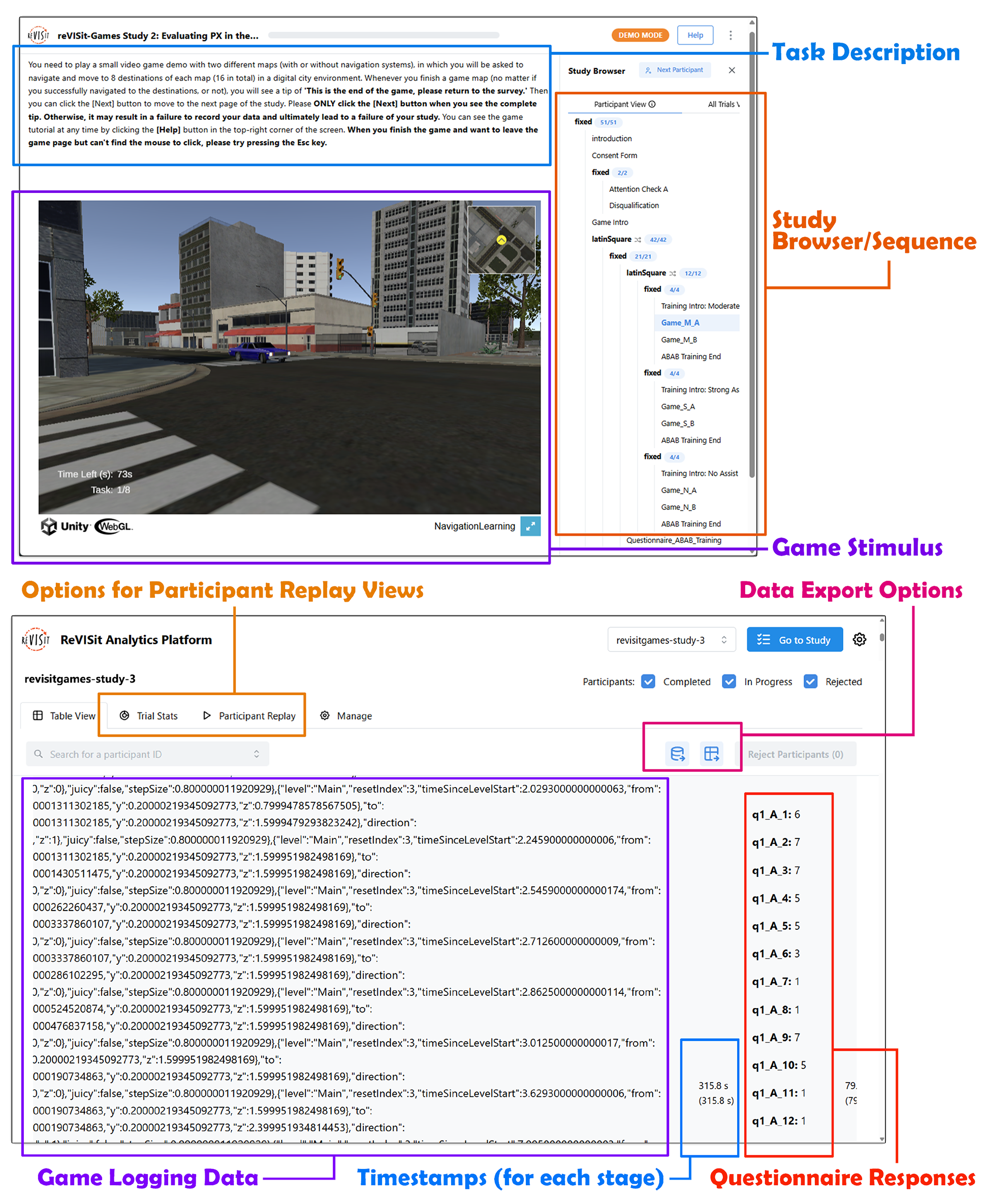
reVISit-Games user view (Top) and researcher view (Bottom) interface
REVISIT-GAMES FRAMEWORK
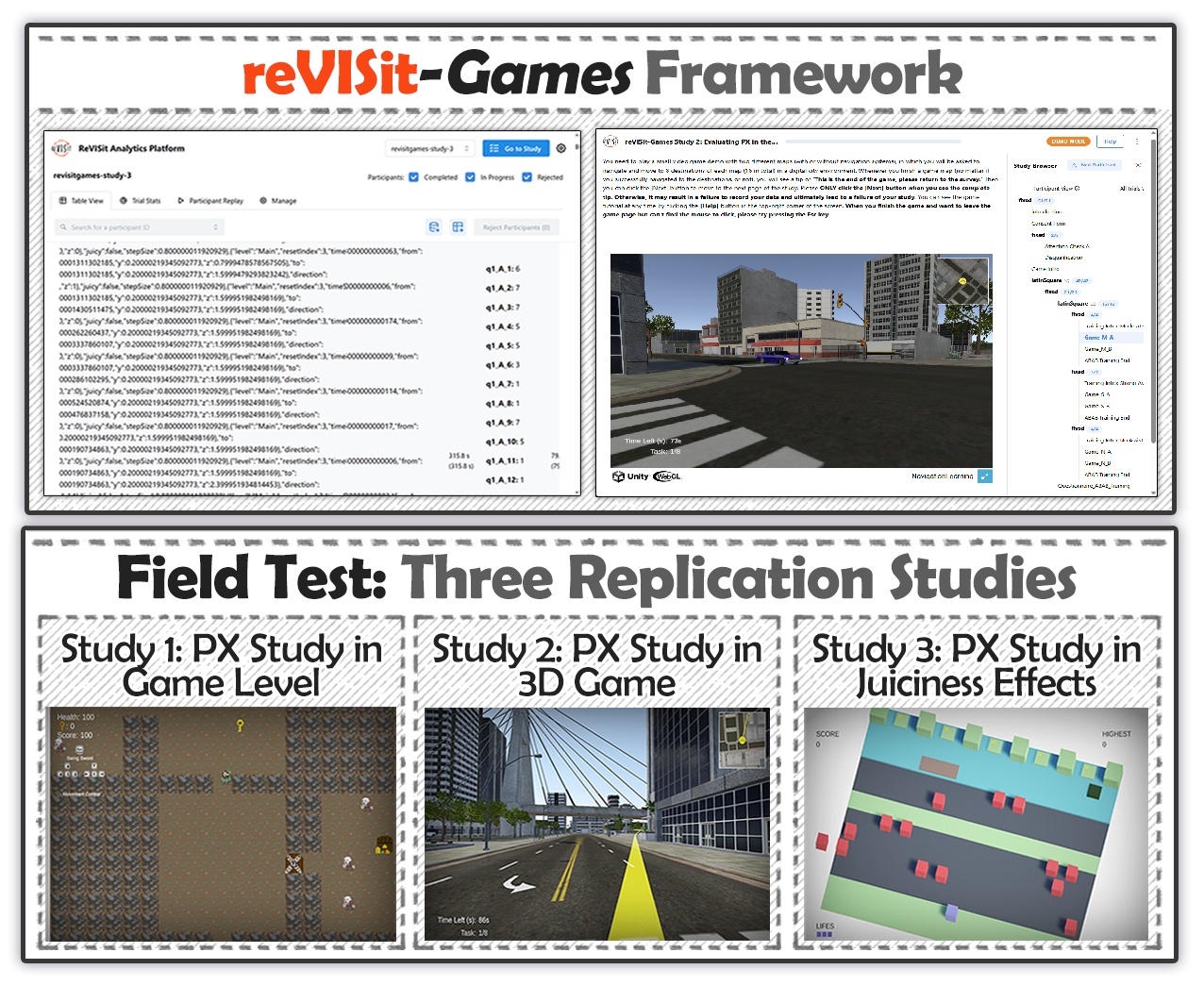
ReVISit-Games builds on reVISit's existing support for study specification, navigation, preview, data collection, and replay, while adding PX-specific support for embedded game stimuli and gameplay-derived data. In this framework, games can be treated as web-deployable study components, such as Unity WebGL builds, and integrated into the same flow as consent forms, instructions, attention checks, questionnaires, and post-study items. Study structure is authored through reVISit's JSON-based DSL, which allows researchers to specify fixed or randomized orders, condition assignment, branching, required responses, and reusable questionnaire blocks. A lightweight JavaScript bridge connects the embedded game with the surrounding study, allowing game events, state variables, completion signals, and study parameters to move between the game and reVISit. This makes it possible to store questionnaire data and gameplay logs in a shared study record, preview and export them together, and preserve study configurations for later inspection or reuse. The paper reporting this framework is currently under review; more details, results, and discussion will be added after peer review is complete.
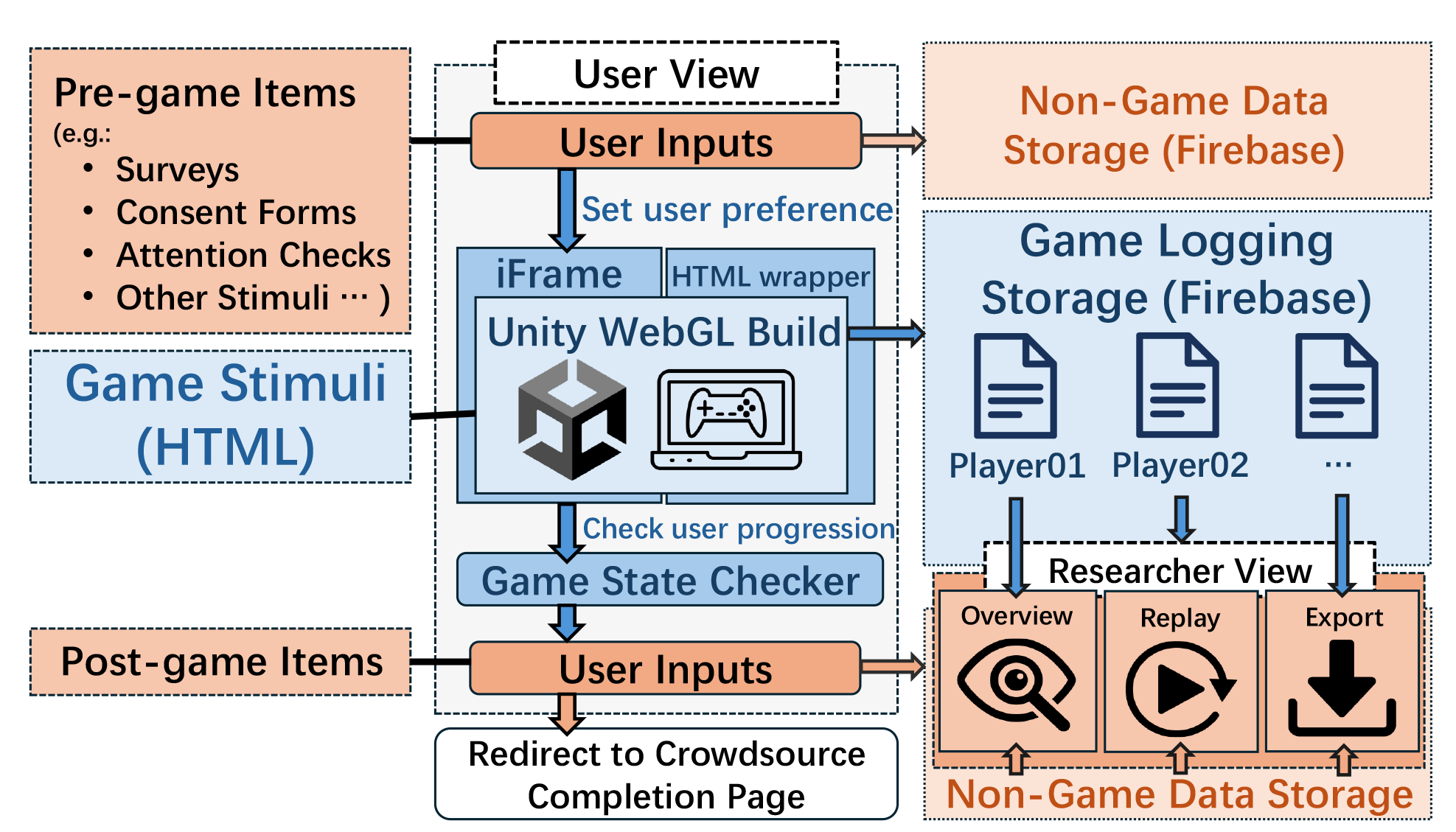
reVISit-Games workflow: core reVISit components in orange, reVISit-Games extensions in blue.
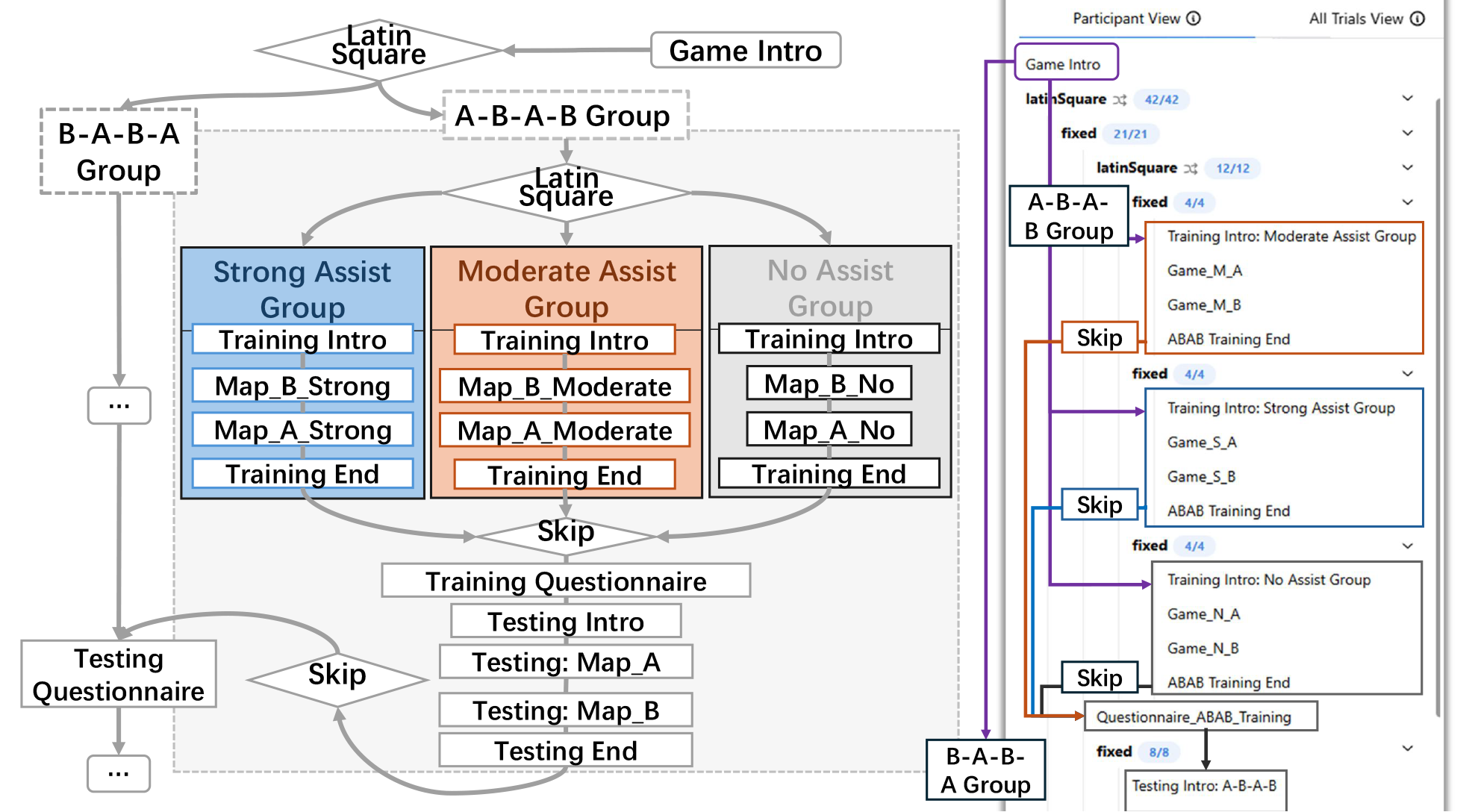
Six study groups merged into one online study, with sequencing logic shown on the left and implementation on the right.
CASE 1: DUNGEON DIGGER WEB
Mixed-Initiative Procedural Content Generation (PCG) Game
The first replication case adapts Sheffield and Shah's 2D player-experience study about procedurally generated dungeon levels. In the original study, participants played six dungeon levels in randomized order and evaluated each level with Game Experience Questionnaire items. Our replication preserved the core study structure while moving the sequencing logic into reVISit-Games; In the original in-lab study, a survey was manually administered after each level, and participants could not continue until the survey was completed. Replicating this process online presented challenges, so we improved the workflow: the game now sends a signal to the parent web app upon successful level completion. This triggers the end-of-level survey, and only after the survey is completed can participants proceed to the next randomly selected level.
Playable Demo
Configure Case 1 Game
Screen note: This Unity WebGL demo is best on a laptop or desktop browser.
Select a level tag, then load the embedded Dungeon Digger Web build in-place. On smaller or slower devices, open the demo in its own page at Configure Case 1 Game.
CASE 2: CITY WANDERER
3D Navigation with Procedurally Generated City Map
The second replication case adapts Johanson et al.'s 3D navigation-assistance study. The original study examined how different levels of navigation support affected route-finding, spatial learning, workload, anxiety, and gameplay performance. Because the original game files and maps were unavailable, we rebuilt the study as a Unity WebGL prototype based on the published description. Using procedural cities not only makes navigation more realistic, but also ensures each player encounters a unique, unfamiliar map. This case was especially useful for testing complex sequencing: the original design combined three assistance conditions with two map orders, producing six study groups. In reVISit-Games, these branches were represented within one online study program, allowing condition assignment, map-order control, training, testing, questionnaires, and gameplay logging to remain coordinated in a single deployment.
Playable Demo
Configure Case 2 Game
Screen note: This Unity WebGL demo is best on a laptop or desktop browser.
Choose a scene, study mode, and assistance level, then load the embedded City Wanderer build in-place. On smaller or slower devices, open the demo in its own page at Configure Case 2 Game.
CASE 3: JUICY FROGGER
The Impact of Juicy Feedback on Player Engagement
The third replication case adapts Hicks et al.'s work on juicy game feedback. We reconstructed a Frogger-like game from the original paper's descriptions and screenshots, preserving the comparison between standard and juicy versions while simplifying the level structure for online deployment. This case tested another capability of reVISit-Games: communication between participant-side study inputs and the embedded game. Participants could select a difficulty setting before play, and that study-side choice was passed into the game at runtime. The replication collected both self-report measures and gameplay logs, including scores, deaths, cleared levels, and play duration.
Playable Demo
Configure Case 3 Game
Screen note: This Unity WebGL demo is best on a laptop or desktop browser.
Select difficulty and whether juicy feedback is enabled, then load the embedded Juicy Frogger build in-place. On smaller or slower devices, open the demo in its own page at Configure Case 3 Game.
Project: ReVISit-Games Suite
The Page Last updated: May 28, 2026